
The Complete Robots.txt Guide for AI Crawlers: 2026 Strategy & Templates
Last Updated: September 5, 2025
There's a file sitting on your web server right now that might be costing you millions in lost opportunity. It's just a few kilobytes. It was probably set up years ago and forgotten. And in 2026, it's become the single most important governance document for your relationship with Artificial Intelligence.
I'm talking about robots.txt.
In the old days of SEO, robots.txt was simple: you allowed Googlebot and blocked spam crawlers. Set it and forget it. But today, dozens of AI crawlers—from OpenAI, Anthropic, Google, Apple, Meta, and countless others—are knocking on your digital door every day. Your robots.txt file determines whether they get in, what they learn about your brand, and ultimately, whether you exist in the minds of AI systems.
The decision you make here ripples into every AI-powered search, every ChatGPT recommendation, every Gemini answer. Get it wrong, and you voluntarily choose Invisible Brand Syndrome. Get it right, and you open a direct channel to billions of AI-assisted queries.
Let's get this right.
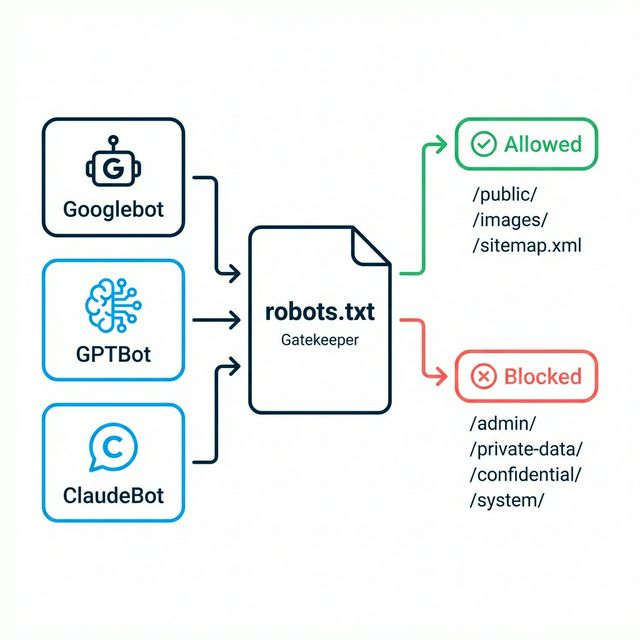
Table of Contents
- Why Robots.txt Suddenly Matters More Than Ever
- The AI Crawler Landscape: Who's Knocking on Your Door
- The Block vs. Allow Decision Tree
- The Selective Permission Strategy
- Copy-Paste Robots.txt Templates
- Common Mistakes and How to Avoid Them
- How to Audit Your Current Robots.txt
- Beyond Robots.txt: The llms.txt Initiative
- Monitoring and Maintenance
- FAQ
Why Robots.txt Suddenly Matters More Than Ever
For 30 years, robots.txt served one primary purpose: controlling how search engines crawled your site. It was a simple traffic cop—let this bot through, block that one.
But here's what's changed:
The Old World (Pre-2023)
- One major crawler (Googlebot) that mattered for 90% of organic traffic
- Crawl = Index = Discovery (straightforward relationship)
- Blocking = No ranking (obvious consequences)
The New World (2024+)
- Dozens of significant crawlers with different purposes
- Crawl ≠ Training ≠ Retrieval (complex relationships)
- Blocking = Complex trade-offs (training vs. live search vs. privacy)
The fundamental shift is this: blocking an AI crawler now has consequences that extend far beyond traditional search rankings. Block GPTBot, and ChatGPT's training data never learns about your new products. Block ChatGPT-User, and you disappear from live AI searches entirely.
The AI Crawler Landscape: Who's Knocking on Your Door
Before making strategic decisions, you need to understand who's visiting your site and why:
Tier 1: The Major Players
| User-Agent | Owner | Primary Purpose | Traffic Impact |
|---|---|---|---|
| GPTBot | OpenAI | Training future GPT models | Future ChatGPT knowledge |
| ChatGPT-User | OpenAI | Live browsing for ChatGPT responses | Immediate ChatGPT visibility |
| Google-Extended | Training Gemini/AI Overviews | Future Google AI knowledge | |
| Googlebot | Traditional search indexing | Standard search rankings | |
| ClaudeBot | Anthropic | Training Claude models | Future Claude knowledge |
| Applebot-Extended | Apple | Training Apple Intelligence | Siri and Apple AI |
Tier 2: Emerging Players
| User-Agent | Owner | Primary Purpose |
|---|---|---|
| PerplexityBot | Perplexity | Live search + future training |
| cohere-ai | Cohere | Enterprise AI training |
| Amazonbot | Amazon | Alexa + AI shopping |
| Meta-ExternalAgent | Meta | Meta AI features |
| Bytespider | ByteDance | TikTok effects + AI |
Tier 3: Data Aggregators
| User-Agent | Owner | Recommendation |
|---|---|---|
| CCBot | Common Crawl | Consider blocking if IP-sensitive |
| DataForSeoBot | DataForSEO | Usually block |
| Diffbot | Diffbot | Context-dependent |
Critical Distinction: Training vs. Retrieval
This is the most important concept to understand:
Training Bots (GPTBot, ClaudeBot, Google-Extended):
- Crawl your content to include in future model training
- Impact comes 3-12 months later when new models are released
- Blocking prevents future knowledge of your brand
Retrieval Bots (ChatGPT-User, PerplexityBot):
- Crawl your content in real-time to answer user queries
- Impact is immediate—block them and you vanish today
- These are the bots you almost never want to block
Hybrid Bots (Googlebot):
- Handle both traditional indexing and AI features
- More complex implications for blocking
The Block vs. Allow Decision Tree
Should you allow AI crawlers? Here's a decision framework:
Start with Your Business Model
Is your content your primary product?
│
├─→ YES (Publisher, data provider, news site)
│   │
│   └─→ Consider blocking TRAINING bots (GPTBot, ClaudeBot)
│       BUT allow RETRIEVAL bots (ChatGPT-User, PerplexityBot)
│       This protects IP while maintaining visibility
│
└─→ NO (Brand selling products/services)
    │
    └─→ ALLOW all AI crawlers
        Your goal is maximum visibility across all AI systems
The Trade-Off Matrix
| Decision | Pros | Cons |
|---|---|---|
| Block All AI | Protects IP, no AI training on your content | Total AI invisibility, lose future discovery channel |
| Allow All AI | Maximum visibility, full AI reach | No IP protection, no content control |
| Selective (Recommended) | Balanced protection and visibility | Requires ongoing management |
When to Block (Be Very Careful)
Block training bots ONLY if:
- Your content is behind a paywall that users pay to access
- You're a major publisher with genuine IP concerns
- You have a legal or compliance reason
Warning: Many companies panic-block AI crawlers for vague "security" reasons. This is almost always a mistake. Unless you're the New York Times, the downside of invisibility far outweighs theoretical IP concerns.
The Selective Permission Strategy
The sophisticated 2026 approach isn't binary—it's surgical. Here's how to implement it:
Strategy Overview
| Content Type | Training Bots | Retrieval Bots | Reason |
|---|---|---|---|
| Product pages | Allow | Allow | Core visibility |
| Pricing pages | Allow | Allow | Agents need this data |
| About/Company | Allow | Allow | Entity building |
| Blog content | Allow | Allow | Thought leadership |
| Customer portal | Block | Block | Privacy |
| Admin/API | Block | Block | Security |
| User data pages | Block | Block | Compliance |
| Premium gated content | Block training, Allow retrieval | Allow | Monetization protection |
Implementation Example
# Baseline: Allow all legitimate bots
User-agent: *
Allow: /

# Standard security - block admin and API areas
Disallow: /admin/
Disallow: /api/
Disallow: /private/
Disallow: /customer-portal/

# Allow all OpenAI crawlers for maximum visibility
User-agent: GPTBot
Allow: /
Disallow: /admin/
Disallow: /api/
Disallow: /private/

User-agent: ChatGPT-User
Allow: /
Disallow: /admin/
Disallow: /private/

# Allow Google's AI training bot
User-agent: Google-Extended
Allow: /
Disallow: /admin/
Disallow: /private/

# Allow Anthropic's crawler
User-agent: ClaudeBot
Allow: /
Disallow: /admin/
Disallow: /private/

# Allow Apple's AI training
User-agent: Applebot-Extended
Allow: /
Disallow: /admin/
Disallow: /private/

# Block aggressive data scrapers
User-agent: CCBot
Disallow: /

User-agent: DataForSeoBot
Disallow: /
Copy-Paste Robots.txt Templates
Here are ready-to-use templates for common scenarios:
Template 1: Maximum AI Visibility (Most Companies)
Best for: B2B SaaS, e-commerce, agencies, service businesses
# Maximum AI Visibility Configuration
# Use for brands that want AI to know and recommend them

User-agent: *
Allow: /
Disallow: /admin/
Disallow: /api/
Disallow: /private/
Disallow: /checkout/
Disallow: /account/

# OpenAI - ChatGPT and training
User-agent: GPTBot
Allow: /

User-agent: ChatGPT-User
Allow: /

# Google AI
User-agent: Google-Extended
Allow: /

# Anthropic - Claude
User-agent: ClaudeBot
Allow: /

# Apple Intelligence
User-agent: Applebot-Extended
Allow: /

# Perplexity
User-agent: PerplexityBot
Allow: /

# Sitemap reference
Sitemap: https://yourdomain.com/sitemap.xml
Template 2: Publisher Protection (Content Businesses)
Best for: News sites, premium publishers, data providers
# Publisher Protection Configuration
# Blocks training but allows live search visibility

User-agent: *
Allow: /
Disallow: /subscriber/
Disallow: /premium/
Disallow: /archive/

# Block training, allow live browsing
User-agent: GPTBot
Disallow: /

User-agent: ChatGPT-User
Allow: /
Disallow: /subscriber/
Disallow: /premium/

User-agent: Google-Extended
Disallow: /

User-agent: Googlebot
Allow: /

User-agent: ClaudeBot
Disallow: /

# Block Common Crawl (training data source)
User-agent: CCBot
Disallow: /

Sitemap: https://yourdomain.com/sitemap.xml
Template 3: Hybrid Approach (Analysis Required)
Best for: Companies with mixed content (some public, some proprietary)
# Hybrid Configuration
# Selective access based on content value

User-agent: *
Allow: /

# Public content allowed for all
# Homepage, product pages, blog, about
# Default Allow covers these

# Proprietary content blocked for training bots
User-agent: GPTBot
Allow: /
Allow: /products/
Allow: /blog/
Allow: /about/
Disallow: /research/
Disallow: /whitepapers/
Disallow: /proprietary-data/

# Live browsing allowed for most content
User-agent: ChatGPT-User
Allow: /
Disallow: /proprietary-data/

# Similar patterns for other AI bots...
User-agent: ClaudeBot
Allow: /
Allow: /products/
Allow: /blog/
Disallow: /research/
Disallow: /whitepapers/

Sitemap: https://yourdomain.com/sitemap.xml
Common Mistakes and How to Avoid Them
Mistake 1: Accidental Blocking
The Problem: A developer added Disallow: / for GPTBot during a "security review" three years ago. Nobody noticed. Your company has been invisible to ChatGPT training ever since.
The Fix: Audit your robots.txt quarterly. Set calendar reminders. Treat this as a marketing document, not just a technical file.
Mistake 2: Blocking ChatGPT-User with GPTBot
The Problem: You wanted to block AI training, so you blocked GPTBot. But you didn't realize ChatGPT-User is a separate bot for live browsing. Now you're invisible to all ChatGPT searches.
The Fix: Understand the difference between training bots and retrieval bots. Block them separately based on your actual goals.
Mistake 3: No Robots.txt at All
The Problem: Your site returns a 404 for robots.txt. Some bots interpret this as "allow everything" (good). Others might be confused (bad). You have no control.
The Fix: Always have an explicit robots.txt, even if it just says "Allow: /"
Mistake 4: Robots.txt in Subdirectory
The Problem: Your robots.txt is at /marketing/robots.txt instead of /robots.txt. Crawlers don't find it.
The Fix: Robots.txt MUST be at the root: yourdomain.com/robots.txt
Mistake 5: Over-Blocking Based on Fear
The Problem: "AI is scary, let's block everything" mentality leads to category-wide invisibility.
The Fix: Ask yourself: "What's the actual harm if AI knows about my product pages?" For most businesses, the answer is "none." The harm from invisibility is far greater.
How to Audit Your Current Robots.txt
Here's a systematic audit process:
Step 1: Access Your Current File
Navigate to yourdomain.com/robots.txt in a browser. Copy the contents.
Step 2: Identify AI Crawler Rules
Look for any of these user-agents:
- GPTBot
- ChatGPT-User
- Google-Extended
- ClaudeBot
- Applebot-Extended
- PerplexityBot
- CCBot
Step 3: Check for Problematic Patterns
| Pattern | Issue | Resolution |
|---|---|---|
User-agent: GPTBot + Disallow: / |
Full OpenAI training block | Remove unless intentional |
User-agent: * + Disallow: / |
Blocks everything | Implement selective rules |
| No mention of AI bots | Relying on wildcard rules | Add explicit allow rules |
ChatGPT-User blocked |
Live search invisibility | Allow unless extreme case |
Step 4: Test Your Configuration
Use Google's robots.txt Tester for syntax validation. Then manually verify by checking:
- Is your homepage allowed for GPTBot?
- Is your pricing page allowed for ChatGPT-User?
- Are admin/private areas blocked?
Step 5: Deploy and Monitor
Make changes, deploy, and monitor for 2-4 weeks. Watch for changes in AI visibility (use tools like AICarma).
Beyond Robots.txt: The llms.txt Initiative
Robots.txt tells AI bots where they CAN go. But there's an emerging standard that tells them what they SHOULD know: llms.txt.
While robots.txt is about access control, llms.txt is about information prioritization. Think of it as giving AI a "cheat sheet" of your most important content in machine-optimized format.
The two work together:
- robots.txt: "You can access these pages"
- llms.txt: "Here's what's most important to understand about us"
Monitoring and Maintenance
Quarterly Audit Checklist
- [ ] Review robots.txt for any unauthorized changes
- [ ] Check for new AI user-agents that should be explicitly addressed
- [ ] Verify critical pages (pricing, products, about) are allowed
- [ ] Test visibility in ChatGPT, Claude, and Gemini
- [ ] Review server logs for AI crawler activity
Ongoing Monitoring
Keep an eye on:
- Crawl frequency: Are AI bots actually visiting?
- New user-agents: Is a new AI service crawling you?
- Visibility changes: Did blocking/allowing affect your AI Visibility Score?
When to Update
Update your robots.txt when:
- Launching new public content sections
- Creating new private/protected areas
- A new significant AI crawler emerges
- Your content strategy changes
- You change hosting or CMS platforms
FAQ
Does blocking GPTBot remove me from ChatGPT immediately?
No. Blocking GPTBot only prevents future training. Your brand will still appear in answers based on existing training data—but that data becomes increasingly stale. Blocking ChatGPT-User, however, removes you from live "Browse with Bing" searches immediately.
What is Google-Extended and why is it separate from Googlebot?
Google-Extended is a token that controls whether your content is used for Gemini/AI training while leaving traditional search indexing (Googlebot) unaffected. It's Google's way of letting you opt out of AI training without sacrificing search rankings. For most businesses, you should allow both.
Can I block only specific pages from AI crawlers?
Yes. Robots.txt works at the directory and file level. You can create granular rules: Allow: /blog/ but Disallow: /blog/proprietary-research/. Use the most specific rules for each content category.
How often do AI companies update their crawler user-agents?
Major changes are rare, but it happens. OpenAI added ChatGPT-User in 2023. Google added Google-Extended in 2023. Expect 1-2 new significant user-agents per year as the AI landscape evolves. Follow AI company announcements and industry publications.
If I already blocked AI crawlers, is it too late to fix?
No. AI training is updated periodically. Unblocking now means new training runs will include your content. The effect isn't immediate—expect 3-12 months for full impact on training-based models. Live search bots (ChatGPT-User, PerplexityBot) will see your content immediately after unblocking.
Should I coordinate robots.txt with my Schema markup strategy?
Absolutely. Schema Markup and robots.txt work together. Robots.txt gets the crawler to your content; Schema markup ensures the crawler accurately understands your content. Optimize both for maximum AI visibility.